

Built for East African Enterprises
Keep Your Business Documents Organised
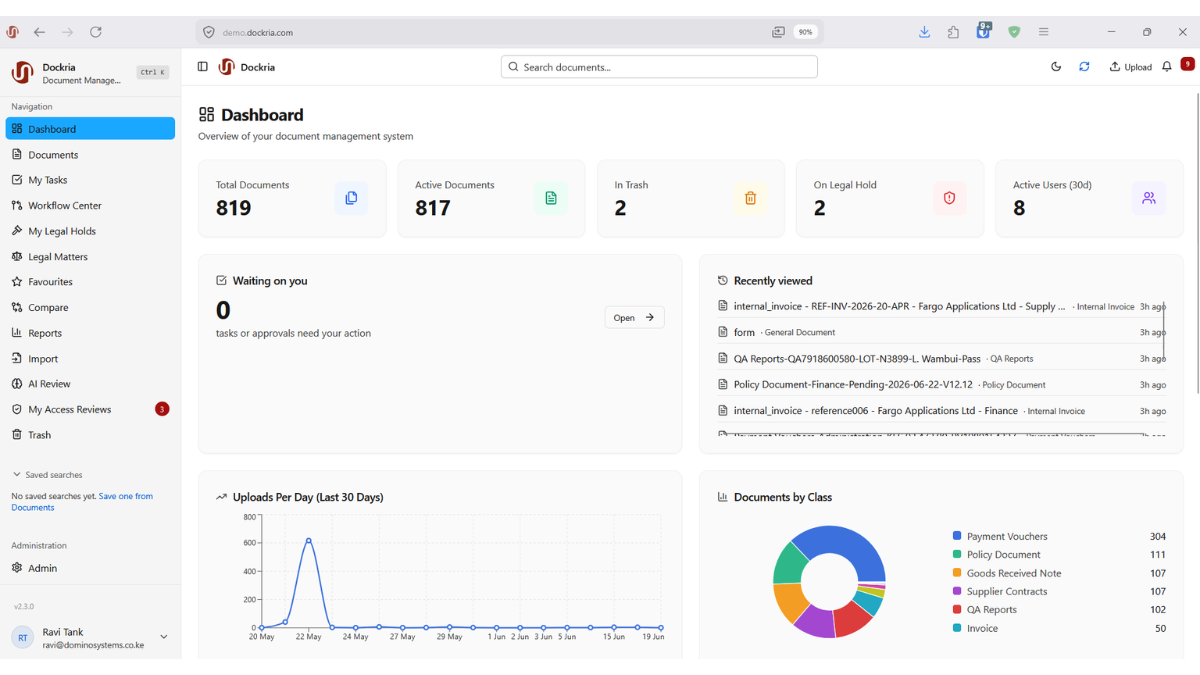
An independent document management system to store files, find the right version and send documents for review. Your team decides who can access them and how long to keep them.
How a document moves through review
One synthetic equipment-justification document, from upload to a recorded decision. Approval here records a review outcome only; it does not sign, archive, order or pay for anything.
Submitter
Upload the request
Add a sample equipment request PDF and choose its document category.
System
Read available text
Dockria tries to read text already in the PDF. It may find no text or report a processing error.
Submitter
Check the details
Check and save the required fields, such as the request reference. Dockria checks that they meet the rules.
Submitter
Send for review
Start the review process your team has set up.
Reviewer
Approve or reject
The assigned reviewer checks the request and records a decision.
Authorised reader
Find it later
People with access can open the request and see its review history.
Illustrative, not executed. An illustrated example using made-up documents, not a recording of a live system or customer process. Your team sets up the steps and status names to suit its work.
Sound familiar?
These are the problems organisations describe to us most often when paper, inboxes and shared drives hold their working documents.
Lost Documents
Critical files dispersed across email chains, shared drives and filing cabinets can be difficult to retrieve.
Compliance Anxiety
The KDPA, GDPR, and industry regulations demand controls you can't prove with spreadsheets and manual logs.
Security Gaps
Sensitive documents shared via email attachments and WhatsApp without access control, encryption, or audit trails.
Manual Bottlenecks
Approval workflows that require printing, walking between offices, and chasing signatures for weeks.
Everything you need to go paperless
Store and find documents, manage reviews and control access. Support your policies with clear records of document activity.
Why organizations choose Dockria
For teams that need to know where their files are, who can use them and what happened during a review.
Controls for Regulated Work
Access permissions, holds, retention and recorded activity are part of the core system, not separate tools. They support your compliance work; they do not replace your policies or legal assessment.
Made for East Africa
Dockria understands the unique regulatory, operational, and infrastructure challenges of doing business in Kenya and the broader East African region. Local support, local expertise.
Recorded, Reviewable Activity
Document activity and workflow decisions are recorded with user and time. Authorised users can filter audit logs, export them and run an integrity check that makes tampering evident.
An Independent EDMS
Manage capture, metadata, review and records controls in an independent system, with optional integrations where needed. Hosting, processing and enabled services still require configuration.
Solutions for every industry
Choose your industry to follow a sample document through review. See who is involved, what happens next and what Dockria does not replace.
Built for strict regulatory environments
Navigating the Kenya Data Protection Act (KDPA) and industry-specific regulations doesn't have to be complicated. Dockria provides technical controls and evidence that support audit preparation. Outcomes still depend on your policies and how the system is configured.
- Recorded Audit Activity
- Class & Operation Permissions
- Configurable Retention & Legal Holds
- Controlled Document Versions
- Review Decision History
- Permitted Evidence Exports
Get started in three simple steps
From first conversation to go-live, each step is agreed with you.
Schedule a Demo
See Dockria in action with a personalized walkthrough tailored to your industry and compliance needs.
Configure & Migrate
Our team helps you set up document classes, workflows, and permissions, and plan the import of your existing documents.
Go Live
Launch with your configured classes, permissions and workflows, and with your team trained on them.
Explore what Dockria can do
Features depend on your setup and access rights. Ask us to show the tools your team needs in a demo.
Frequently asked questions
Everything you need to know about Dockria EDMS.
What is Dockria EDMS?+
Dockria is an enterprise document management system designed for organizations in Kenya and East Africa. It is an independent system for capturing, organising, reviewing and controlling business documents, with configurable metadata, permissions, review workflows, version history and recorded activity.
Does Dockria help with Kenya Data Protection Act obligations?+
Dockria provides controls that support KDPA work, including role-based access, privacy tools, configurable retention and recorded audit activity. Software alone does not make an organisation compliant; your policies, configuration and legal assessment remain necessary.
Can I migrate from another document management system?+
Dockria includes configurable import facilities, and our team plans migrations with you. The scope depends on what your current system can export; a complete one-click transfer of every version, permission and workflow is not something we promise.
How is my data secured?+
Your team sets who can open a document and what they can do with it. The document category and review stage can affect that access. You can restrict or revoke share links, but not recall downloaded copies. Audit checks can reveal signs of changed logs. Ask for security details for the system you will use.
Does Dockria support electronic signatures?+
Dockria supports electronic signing and supporting evidence. Available authentication and delivery options depend on configuration; legal effect requires a separate assessment.
How should I evaluate browser access?+
Include the browsers and devices your team uses in an authorised demonstration. Verify viewing, review and permitted downloads on each required device.
Ready to manage documents in one place?
See your own document process configured in Dockria, or start with our evaluation checklist.