
Document Version Control & Check-Out
Maintain a complete visual history of every document revision. Checkout locking prevents conflicting edits, while version labels and comments provide context for every change.
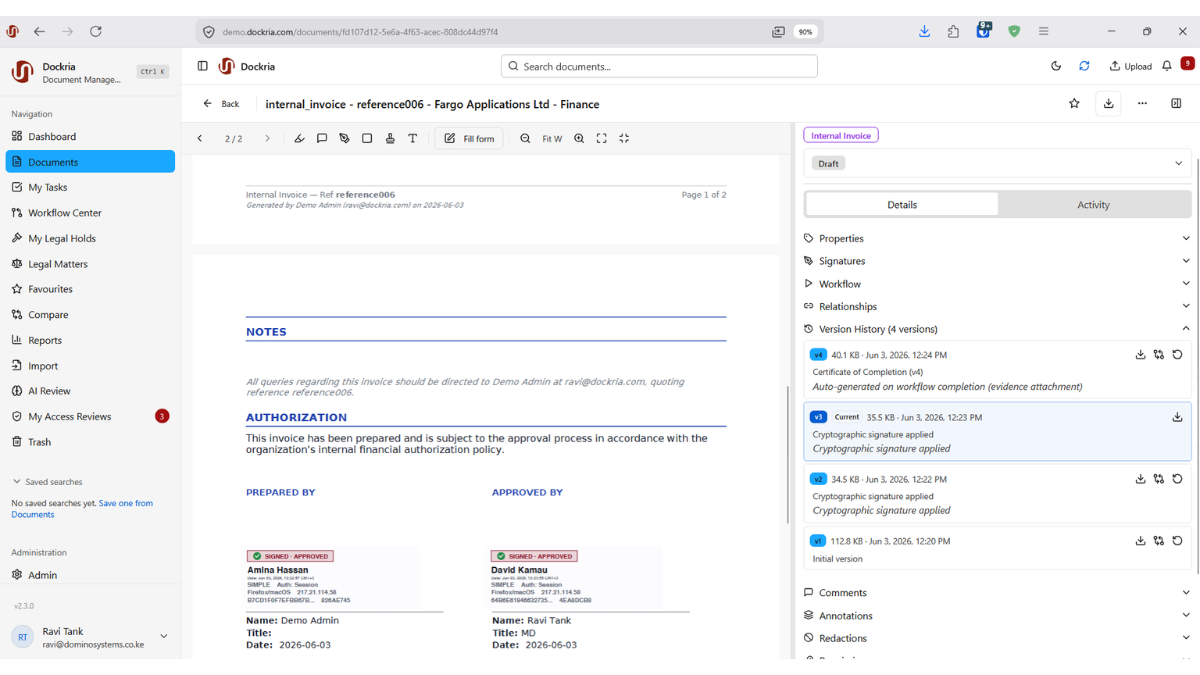
In organisations where documents go through multiple rounds of review, editing, and approval, keeping track of the correct version is a constant challenge. Which draft is current? Who made the last changes? Can we go back to last week's version? Dockria's Version Control answers all of these questions definitively.
Every time a document is modified, Dockria automatically creates a new version while preserving the complete history. A visual timeline shows every version with timestamps, author information, and optional labels and comments. Navigate to any point in a document's history and see exactly what it looked like at that moment.
The checkout and check-in system prevents the classic problem of simultaneous edits. When a user checks out a document for editing, other users are informed that the document is locked and by whom. Only the user who checked out the document can save changes. When they check it back in, the new version is created and the lock is released.
Need to revert to a previous version? One-click restore creates a new version from any historical state. No data is ever overwritten or lost. Add version labels like 'Client Approved' or 'Board Final' to mark significant milestones, making it easy to find and reference key versions in a document's lifecycle.
Key Benefits
Visual Version Timeline
See every version of a document in a clear visual timeline with timestamps, author details, labels, and comments.
Checkout Locking
Prevent simultaneous edits by locking documents during editing. Other users see who has the document checked out and when.
One-Click Restore
Restore any previous version instantly without overwriting the current state. Every version is preserved permanently.
Version Labels & Comments
Tag significant versions with labels like 'Final' or 'Approved' and add comments explaining what changed and why.
Industry Use Cases
Law firms track every revision of contracts and legal opinions, with checkout locking preventing conflicting edits by multiple attorneys.
Factories maintain controlled revision histories for Standard Operating Procedures, ensuring production teams always use the current approved version.
Government agencies track the evolution of policy documents through multiple review cycles, with version labels marking ministerial approvals.
Hospitals maintain version histories for clinical protocols and formulary documents, satisfying regulatory requirements for change documentation.
Related Features
See How This Feature Applies to Your Industry
Ready to see version control & checkout in action?
Schedule a personalised demo and discover how Dockria can transform your document management operations.
Request a Demo