
Document Comparison & Version Diff Tool
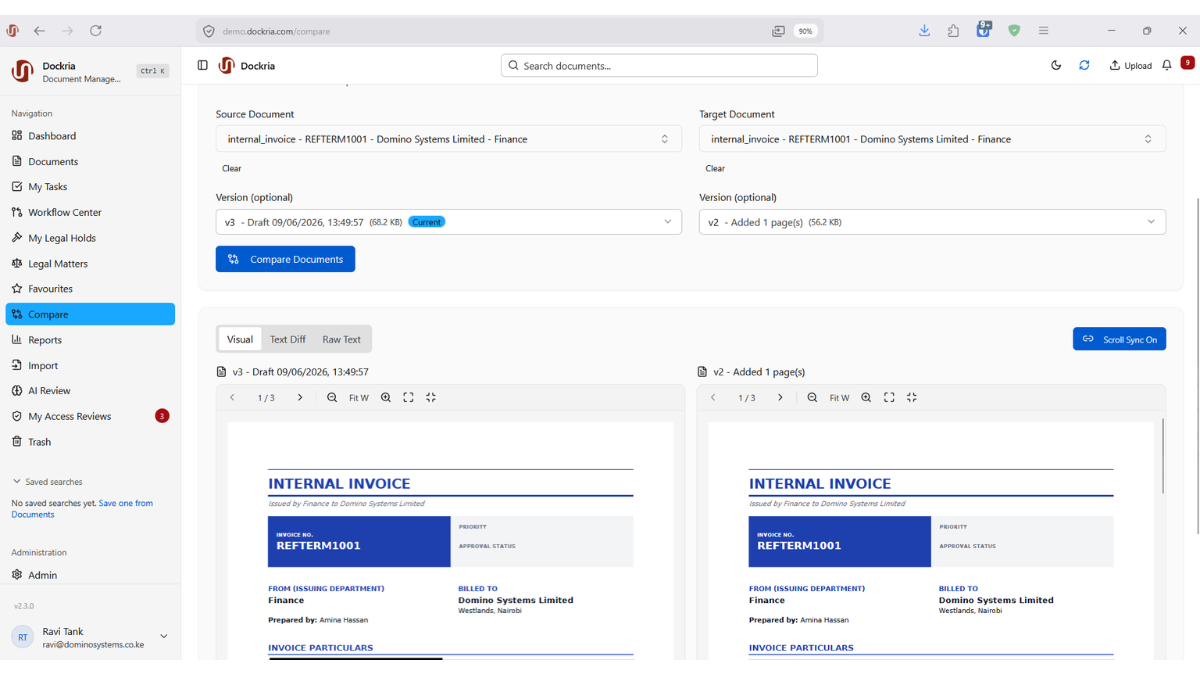
Compare two versions of a document, or two entirely different documents, side by side with visual diff highlighting and synchronised scrolling. Spot additions, deletions, and modifications instantly.
When a contract comes back from negotiation with 'minor changes', how do you know exactly what was modified? When a policy is updated, how do you identify every change between the old and new versions? Manual comparison is slow, unreliable, and risks overlooking critical modifications. Dockria's Document Comparison solves this completely.
Place any two documents or document versions side by side with synchronised scrolling. Visual diff highlighting instantly shows additions, deletions, and modifications using clear colour coding. Scroll through one document and the other follows, keeping corresponding sections aligned for easy review.
Text-level comparison goes deeper, identifying changes at the word and character level. This is invaluable for legal teams reviewing contract redlines, compliance officers tracking policy changes, and anyone who needs to verify that only authorised modifications were made to a document.
Document Comparison integrates seamlessly with Dockria's version control system. Compare any two versions in a document's history with a single click, review the differences, and decide whether to accept the changes, restore a previous version, or create a new version with selected modifications. Every comparison action is recorded in the audit trail.
Key Benefits
Side-by-Side View
View two documents or versions simultaneously with synchronised scrolling that keeps corresponding sections perfectly aligned.
Visual Diff Highlighting
Additions, deletions, and modifications are instantly highlighted with clear colour coding, so nothing is overlooked.
Text-Level Precision
Identify changes at the word and character level for precise verification of contract redlines and policy updates.
Version History Integration
Compare any two versions in a document's history with a single click, directly from the version timeline.
Industry Use Cases
Law firms compare contract drafts returned from negotiation to verify that only agreed changes were made, protecting their clients' interests.
Policy teams compare successive drafts of legislation and regulations to track how provisions evolved through the review process.
Compliance officers compare updated financial regulations against previous versions to identify new requirements that affect operations.
Hospital administrators compare clinical protocol revisions to ensure all safety-critical changes are identified and communicated to staff.
Related Features
See How This Feature Applies to Your Industry
Ready to see document comparison in action?
Schedule a personalised demo and discover how Dockria can transform your document management operations.
Request a Demo