
Read Any Document Without Downloading It
View PDFs, images, and converted Office files right in your browser, with status badges, page navigation, and a full toolbar, keeping every sensitive file safely inside the platform.
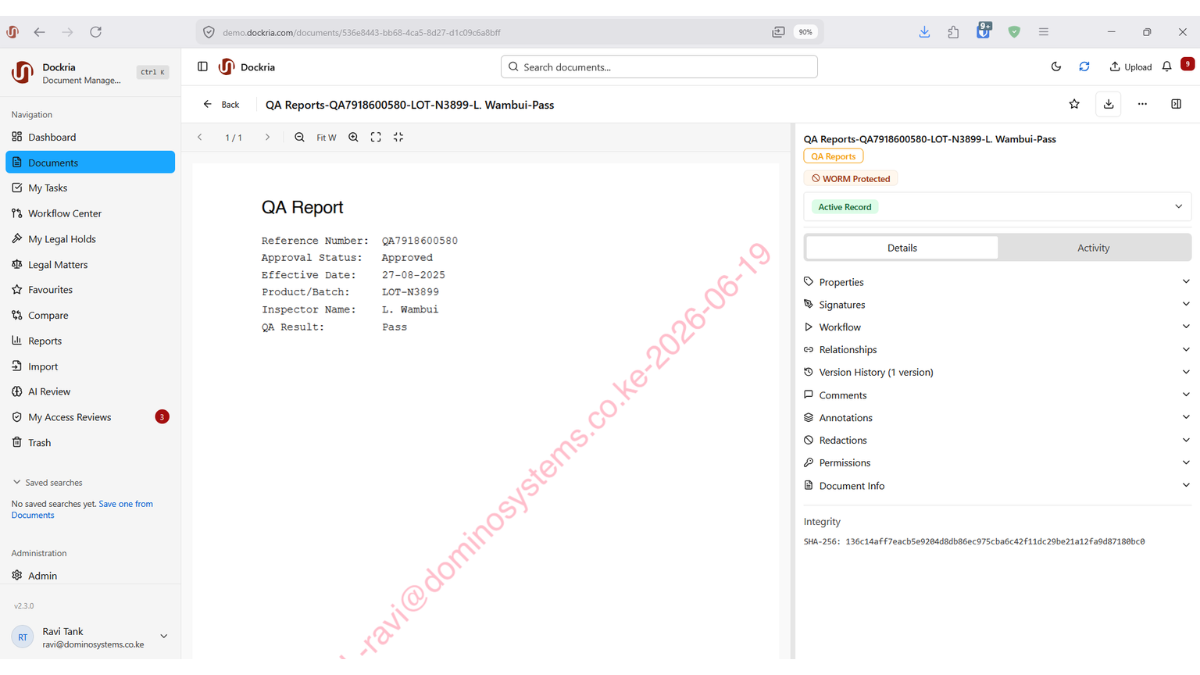
Every time a sensitive document is downloaded to a laptop or phone, it becomes a risk that lives outside your control. Dockria's in-browser Document Viewer removes that risk by letting users read documents in full without ever downloading them. The file stays inside the platform, protected by the same access controls as everything else.
The viewer handles the formats your organisation actually works with. PDFs and images display natively, and Office files such as Word and Excel are automatically converted to a clean preview rendition so they can be read in the same window, no desktop software, no compatibility headaches.
Status is visible at a glance. As you browse, each document shows clear badges for its state (checked out, on legal hold, WORM-protected, its record status, sensitivity label, OCR status, and document class) so you always know what you are looking at and what you are allowed to do with it before you act.
A full toolbar with page navigation and keyboard shortcuts makes reading long documents fast, and a side-by-side layout lets you read a document on one side while entering or reviewing its metadata on the other, turning filing and indexing into a smooth, single-screen task.
Key Benefits
No-Download Viewing
Read documents in full without downloading them, keeping sensitive files inside the platform and under your access controls.
Universal Format Support
View PDFs and images natively, with Office files automatically converted to a clean preview, no desktop software required.
At-a-Glance Status Badges
Instantly see whether a document is checked out, on legal hold, WORM-protected, or carries a sensitivity label before you act on it.
Full Viewer Toolbar
Navigate pages and use keyboard shortcuts to move through long documents quickly and comfortably.
Metadata While You Read
A side-by-side layout lets you review the document on one side and enter or check its metadata on the other.
Keeps Files Secure
Because nothing leaves the platform, confidential documents never end up scattered across personal devices.
Industry Use Cases
Lawyers review lengthy contracts and bundles on screen without creating uncontrolled copies on personal devices.
Clinicians view patient records and scans securely in the browser, with sensitivity labels visible at all times.
Auditors and reviewers read statements and supporting documents in place, leaving no downloaded copies behind.
Officers read classified correspondence on screen with clear status badges signalling handling restrictions.
Related Features
See How This Feature Applies to Your Industry
Ready to see in-browser document viewer in action?
Schedule a personalised demo and discover how Dockria can transform your document management operations.
Request a Demo